BUYING STOCKS · TROUBLESHOOTING
No stocks tab in your Binance app? Check four layers
This is the single most common place people stall. They open the app, hunt around, find nothing labelled stocks, and decide their country is excluded. Usually it is not.
Two things not to do first
Do not open a second account. Registering twice as the same person triggers risk controls, and that costs more than the problem you are trying to solve.
Do not use tools to fake your location. Even if it is a genuine regional restriction, what you get is an account that can be frozen with your funds and positions inside it. This site does not publish those methods.
WHAT THIS COVERS
- First: which "stocks" section are you looking for
- Layer one: did verification actually pass
- Layer two: the client is too old
- Layer three: cache and interface language
- Layer four: your jurisdiction really is out of scope
- Why this particular problem gets misdiagnosed so often
- What switching devices or accounts actually tells you
- Once it appears, do not rush the first order
The four layers below run from most likely to least likely. Work through them one at a time. Do not change three things at once. If it starts working you will not know which change did it, and you will be back here next time.
Two things you can check yourself first. Binance's stocks product page describes what the feature is (settlement currency, minimum, fractional shares), and its identity verification help article describes what layer one requires. The four layers below run from most likely to least.
First: which "stocks" section are you looking for
Settle this before troubleshooting, or you will work through all four layers and still come up empty. There are two things called stocks inside Binance, and they are different products.
Two things called stocks, side by side
| US stocks on the main platform | The "stocks" area in Binance Wallet | |
|---|---|---|
| What you get | Real US shares and ETFs | Tokenised stocks issued by third parties |
| Who provides it | Binance's stock trading service | Independent third-party issuers and protocols |
| Where | The trading area of the main site or app | Inside Binance Wallet, the Web3 wallet |
| Settlement | USDC, T+1 | On chain, per each protocol |
Binance was blunt about this in its announcement of 12 August 2026: the wallet section is a discovery and aggregation interface, Binance Wallet does not "issue, offer, sell, broker, underwrite" any security or tokenised security through it, and what appears there comes from "independent third-party issuers, protocols or applications". The announcement is worth two minutes (checked 2026-09).
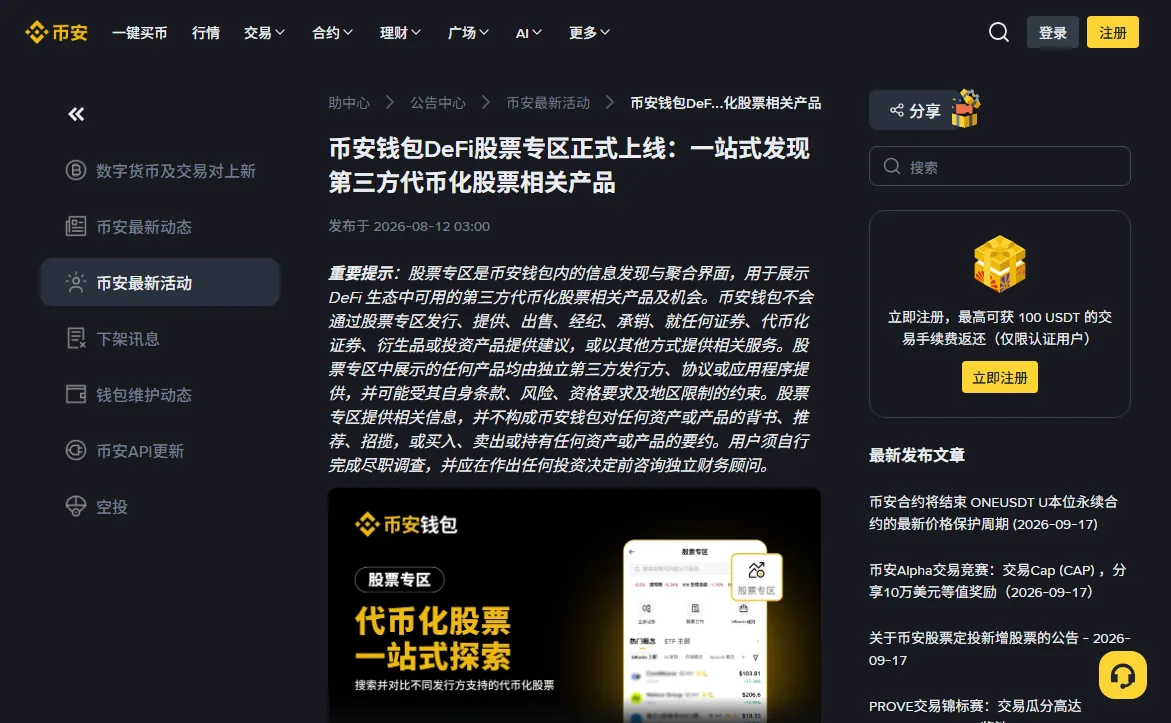
That is a difference in risk, not in wording. Buy on the main platform and you hold a real share, with the chain of parties behind it to answer to. Buy in the wallet and you hold a token somebody else issued, and that somebody is who you are relying on. Everything on this site is about the first.
So answer one question first: do you want real shares, or on-chain exposure to a share price? If it is real shares, stop looking in the wallet — they were never there, and finding nothing is the correct outcome. Then work through the four layers below on the main platform.
Layer one: did verification actually pass
This explains a large share of cases. Without completed verification the stocks tab does not appear, and that is by design, not a fault.
The trap is that "in review" and "verified" are different states and people conflate them. Submitting successfully is not the same as passing.
Go to the verification page and read the current status; do not rely on memory. If it says in review, there is nothing to troubleshoot, just wait. If it failed or asked for more, the problem is verification itself, and we mapped each rejection message to a fix in the rejection guide.
A variant: verified, but not to the level required
Some features correspond to higher verification tiers. If you only completed the basic level, check whether there is a further step available on your verification page.
Layer two: the client is too old
Stock trading launched in June 2026. Older app builds do not contain that entry point at all. It is not hidden; it does not exist in that version.
Check the app store for an update. Two catches: automatic updates get silently skipped for storage or data-saving reasons, so the version you think you have may not be the version you have; and after updating, fully quit and reopen rather than switching away and back.
If you normally use the web interface, try the app as well, and vice versa. Feature rollouts across the two are not always simultaneous.
Layer three: cache and interface language
The least intuitive layer, and the most overlooked.
Apps cache interface structure. After a feature update, a stale cache can mean the new entry point simply does not render: you updated the version but you are still looking at the old layout. Clear the cache in settings, quit fully, reopen.
Separately, some readers report the entry point appearing only after switching the app's interface language. We have not been able to confirm that through official channels, so we present it as a cheap thing to try rather than a stated fact: change language, clear cache, restart, see what happens. It costs almost nothing. If it does not help, it does not help.
Why order matters
All four layers present identically — no tab. Change the version, clear the cache and switch language together, and if it appears you have learned nothing. Next device, same puzzle. One change, then verify. This is just how you debug anything.
Layer four: your jurisdiction really is out of scope
Only after the first three are ruled out.
Binance describes availability as "eligible users in permitted jurisdictions" and publishes no country list, and the scope changes. So there is no lookup table that answers this. What your account displays is the platform's determination for your account.
One thing is explicit: Binance does not serve US persons, and neither stock trading nor bStocks is open to them. That covers tax residency, not only citizenship. EU residents have also been reported unable to open new accounts, and the UK has been closed to new users.
If it genuinely is a regional restriction, the honest answer is that this route is closed to you for now. Watch for changes; do not go looking for workarounds. To move through these layers quickly, the five-step check asks them in order.
Why this gets misdiagnosed so reliably
Because the four layers look the same from the outside. The interface does not say "hidden because X"; it just does not show anything.
Faced with missing information, people pick the least effortful explanation, and "not supported here" is exactly that: it requires no action and permits giving up. That is cognitive economy, not diagnosis.
Online discussion pushes the same way. Search this problem and a disproportionate share of results are about regional blocks and workarounds, because that topic travels. Nobody posts about not having read their verification status carefully, so survivorship bias leaves you believing region is the usual cause.
Two cheap experiments
Same account, different device. If the tab appears on another device or on web, the problem is client-side (version or cache) and has nothing to do with your eligibility. This is the cleanest single test.
Different account, same device. If someone else's account shows the tab on your device while yours does not, the problem is account-level: verification or eligibility. To be explicit, that means they log in themselves, not that you take their credentials. Never do that.
Cross the two results and you have usually identified the layer without any guesswork.
Why this particular problem gets misdiagnosed so often
Worth its own section, because it explains why so many people's first instinct is "my country must not be supported".
All four layers fail identically. Verification not through, client too old, cache stale, jurisdiction excluded — you see the same thing every time: the entry point is not there. The interface never says "you cannot see this because X". It just does not render it.
Given missing information, people reach for the cheapest available explanation. "Not available in my region" is the cheapest one going: it requires no action and licenses you to stop. That is cognitive economy, not correct inference.
Online discussion pushes the same way. Search this problem and a large share of the posts are about regional restrictions and ways around them, because that topic travels. Nobody writes a post about having misread their own verification status — so survivorship bias leaves you thinking geography is the usual cause.
What switching devices or accounts actually tells you
Two cheap controlled tests are worth more than another round of cache clearing.
Same account, different device
If the entry point appears on another device — or when you move from the app to the web version — the problem is on the client side: version or cache, nothing to do with your account's eligibility. This is the cleanest signal of the two.
Same device, different account
If a friend's account shows the entry point on your device while yours does not, the problem sits at the account layer: verification status or an eligibility determination.
⚠️ To be precise about what that means: they log in themselves and look. You do not take their credentials. Handing account passwords around is a separate and much worse problem, and there is no situation on this route where it is the right move.
Cross the two results and you will usually know which of the four layers you are on. That beats clearing the cache a fourth time.
Once it appears, do not rush the first order
Seeing the tab means you can trade, not that you are ready to. Suggested order:
- Turn on account protection first: 2FA, anti-phishing code, withdrawal whitelist. All in the account walkthrough;
- Then look at the cost structure and decide your first order size;
- Then understand when money becomes available after selling.
The third gets skipped most and surprises people hardest. US equities settle T+1 and until that completes the proceeds cannot move to futures or be withdrawn; timeline in settlement and withdrawal. And before that first order, run the numbers through the cost calculator: below and above 340 dollars are different worlds.